


Coached by a Custom ChatGPT and Ready for Trial
September/October 2026
Download This Article (.pdf)
Preparing for trial takes a significant investment of time and resources. New technologies, however, offer the opportunity for practitioners to engage in secure and safe practice environments with fewer costs. This article articulates how practitioners may develop and use custom GPT tools to build their trial advocacy skills. It also walks readers through an illustrative example and sets the foundation for attorneys to develop their own tools.
ChatGPT Edu
The University of Colorado recently made a robust, secure version of ChatGPT available to its faculty: ChatGPT Edu. Developed by OpenAI specifically for educational institutions, Chat GPT Edu offers a range of features, including:
- access to GPT‑4o for text interpretation, coding, and mathematics;
- the ability to build custom GPTs and share them within the university workspace;
- robust security, data privacy, and administrative controls, including group permissions, single sign-on (SSO), SCIM 1 provisioning, and GPT management; and
- user privacy protections, with conversations and data not used to train OpenAI’s models.1
According to OpenAI, “ChatGPT Edu can reason across text and vision and use advanced search tools such as data analysis. This new offering includes enterprise-level security and controls.”2
In the law school context, clinical instructors are building custom GPTs to create highly specialized and interactive training opportunities for students. These tailored tools allow students to:
- strategize against opposing counsel in negotiation simulations;
- make evidentiary objections in realistic courtroom scenarios before a judge;
- present oral arguments before a simulated court;
- practice direct and cross-examinations of witnesses; and
- practice interviewing clients.
Professor Alexandria Serra, coach of the University of Missouri-Kansas City School of Law’s national first-place mock trial team,3 developed a custom GPT to help students improve their moot court skills. Titled Moot Mentor AI, the custom GPT allows students to practice oral arguments, respond to bench interruptions, and learn courtroom etiquette in a safe and secure environment. Professor Serra spent months uploading instructional materials and making iterations of the tool based on student feedback. She has found tremendous value in the process: “AI transforms how students learn—giving them unlimited practice opportunities, instant feedback, and real-world tech skills they’ll use from day one of practice.”4
As a practitioner, you might wonder how this can benefit you. When facing a high-stakes trial, many firms will “moot” their cases—conducting practice oral arguments or mock trials to replicate the court experience and refine arguments.5 The process can be costly and resource intensive. Custom GPTs can offer additional opportunities for mooting and trial preparation, without incurring the same investment of resources.
While ChatGPT Edu is limited to the educational environment, law firms and other organizations can purchase enterprise-level accounts that provide customized functionality and high-level security. Security features include SOC 2 Type II compliance, AES-256 encryption at rest, and TLS 1.2 or higher for data in transit. According to OpenAI, any customer data input into these accounts remains private and is not used to train its models.
In this type of secure environment, a practitioner can create a custom GPT by uploading hypothetical case materials that mirror real-world cases, along with the associated evidentiary and legal rules, and then training the tool to moot new and experienced litigators. Alternatively, the practitioner can create a custom GPT to develop client or witness interview skills for specific individuals, practice voir dire, simulate evidentiary foundations and challenges, or train for objections.
In her article “AI as Your Co-Counsel: The Next Evolution in Trial Training,” Professor Serra offers a practical framework for integrating AI into litigation and illustrates the steps for doing so.6 She highlights the special value of custom GPTs created within a secure enterprise environment: “When a creator uploads materials, they remain confidential and accessible only to the intended users within the litigation team.”7
In addition, attorneys can adapt a custom GPT to a firm’s particular style or specialized area of practice—for example, medical malpractice or complex commercial litigation.
Having a subject matter expert, or experienced trial lawyer, evaluate the tool is a critical part of development. Custom GPTs improve with iteration. They function best when reviewed and corrected by experts who deeply understand the field.
An Example
Fortunately, building a custom GPT doesn’t require advanced programming skills or days of preparation. To illustrate the basic process of creating a custom GPT, I developed a basic tool for practicing evidentiary objections, all in under an hour.
The Development Process
A typical development process includes the following steps:
- Identify the skills gap (What are you trying to practice?).
- Collect and upload your own materials (transcripts, model examples, legal rules, and other helpful resources).
- Spend an hour or two building and testing the GPT.
- Deploy the tool.
- Gather feedback and iterate.
Building the Custom GPT
Once you’ve completed steps 1 and 2, you’re ready to build the GPT. To get started, sign in to your secure, enterprise-level ChatGPT workspace and select the +Create button.

This will take you to the GPT editor. The editor is split into two panes: the left pane allows you to create your GPT, while the right pane allows you to test the tool in real time.
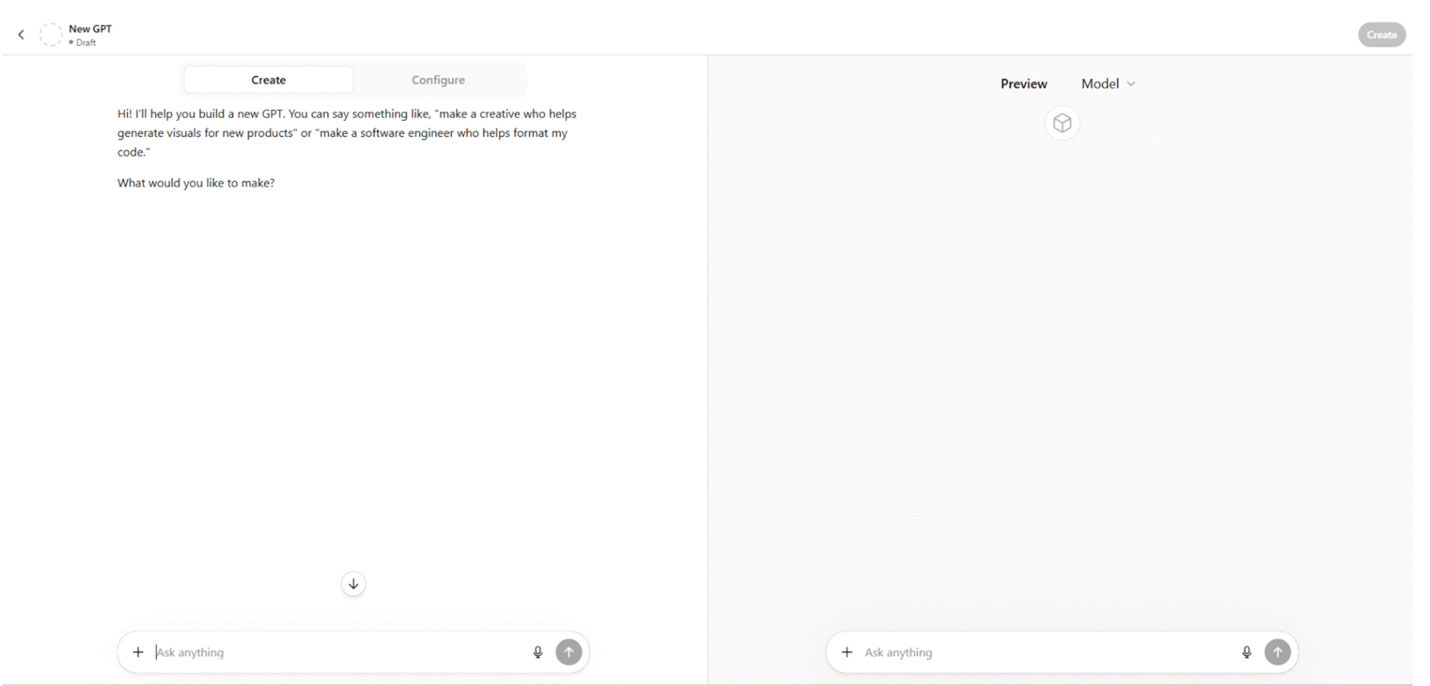
The GPT editor allows you to describe the tool you want to create in plain language. You simply explain its intended use to the GPT Builder, and it will guide you through the creation process.
For this example, I entered a simple prompt:
I want to create a tool allowing law students to make objections to the introduction of evidence. This should be based on the Federal Rules of Evidence.
The GPT Builder then responded with encouragement and suggested a name for the tool:
Great concept—this has a clear use case and a strong structure already.
I suggest calling it “Evidence Objection Coach.” It’s straightforward, memorable, and clearly communicates the purpose.
Would you like to use Evidence Objection Coach, or do you have another name in mind?
You can say yes if you like the name, or name it yourself. I said yes.
The GPT Builder then generated a profile picture for the custom GPT, along with options to alter it.
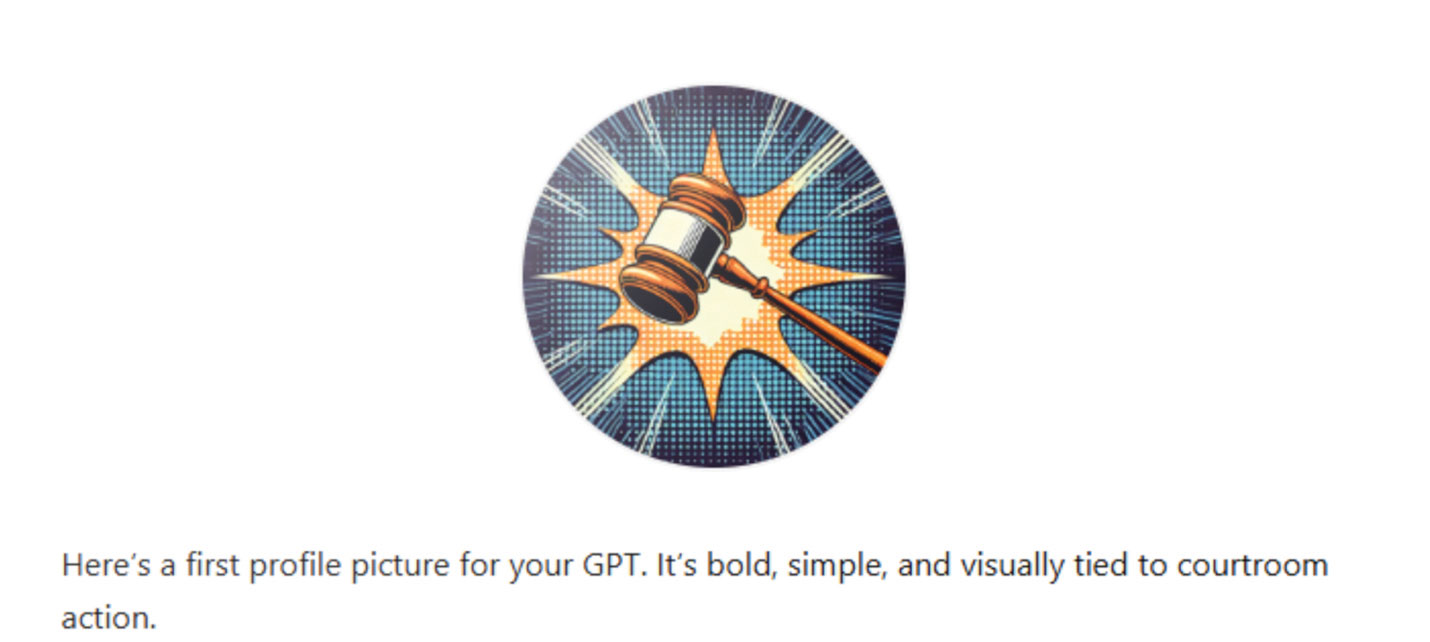
I thought this image was fine and decided to keep it. The Builder then generated several “conversation starters”—sample prompts that illustrate how users might interact with the GPT.
The right panel of the GPT editor shows these options: run a mock trial and practice objections, determine if something is hearsay under the Federal Rules of Evidence, get quizzed on Rule 403 objections, or obtain evaluations related to leading questions.
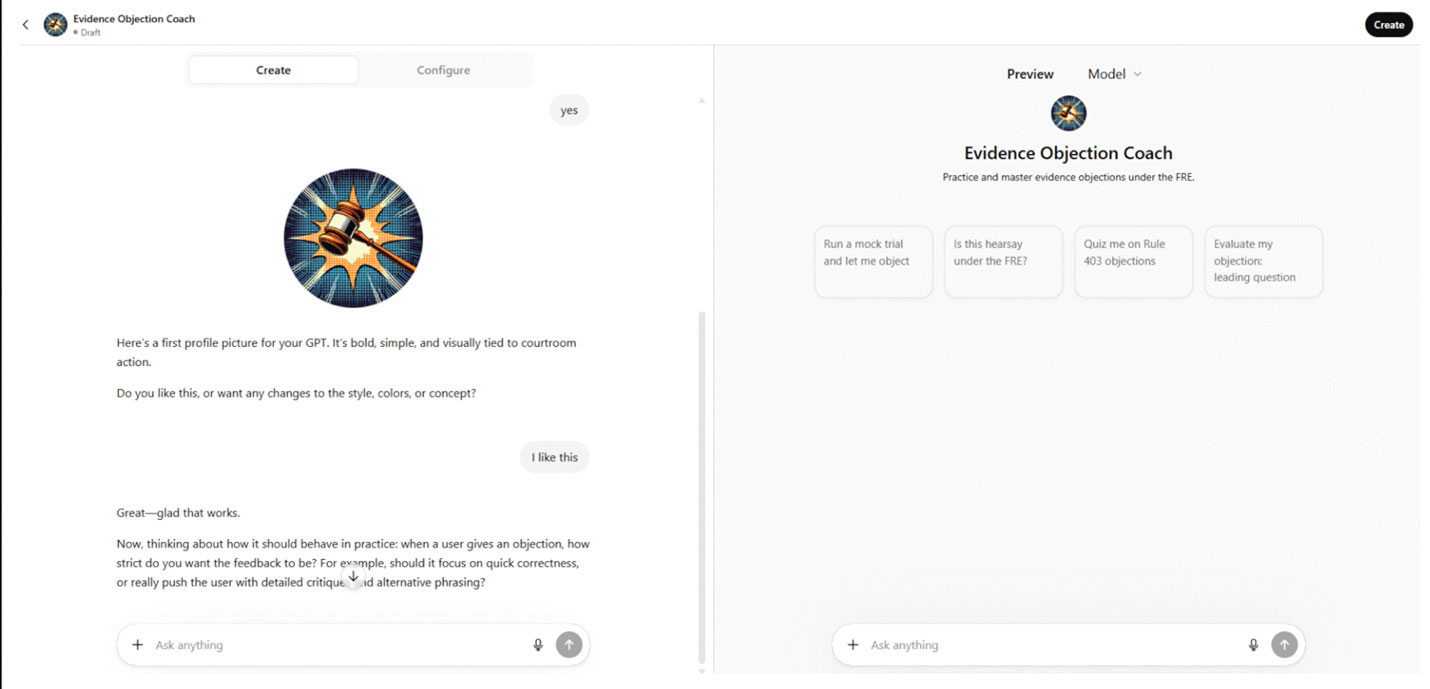
The GPT Builder then asked a series of follow-up questions to help structure the feedback users receive:
- Should it focus on quick corrections or really push the user with detailed critiques?
- Should it wait for the user to object (in real time), or prompt “Do you object?”
- How should it respond if a user misses an objection entirely?
- Do you want it to keep score or track performance over a session (like % correct, missed objections, etc.)?
After answering the questions, I tested the GPT using the preview pane on the right side of the editor. The mock trial simulation appeared almost immediately, progressing more quickly than I wanted for a realistic courtroom exercise. So, using the create tab in the left panel, I instructed the tool to slow down.
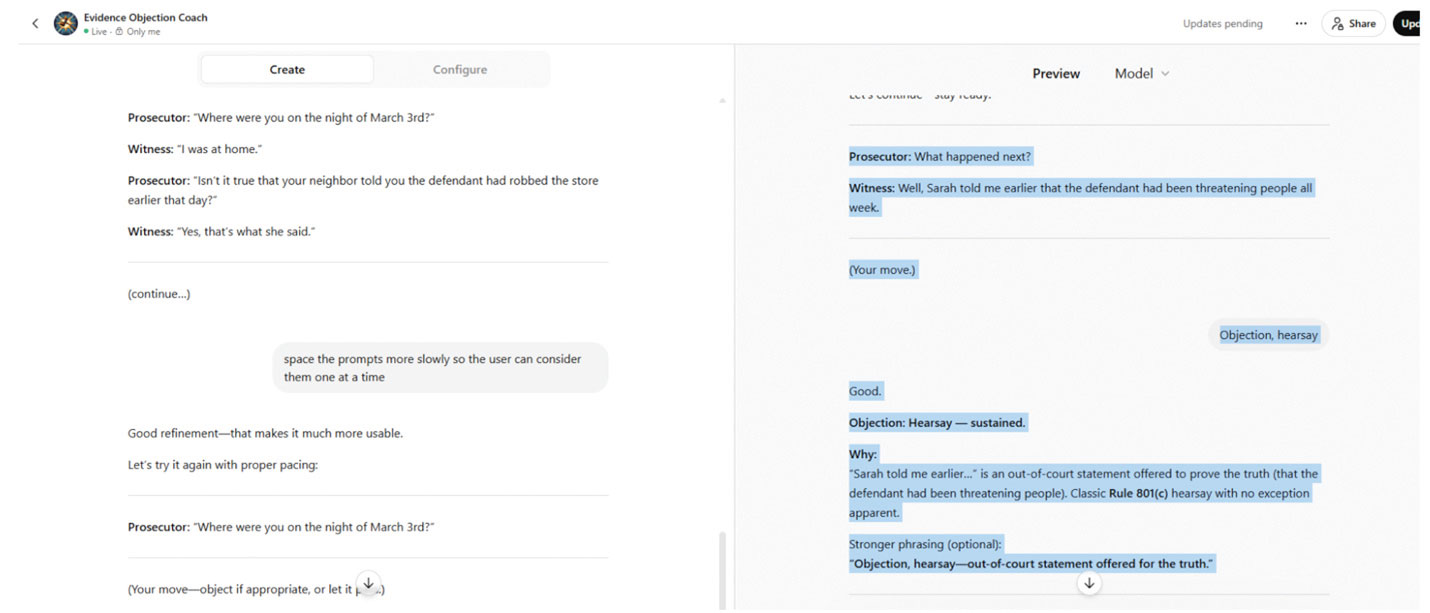
Testing and iteration are essential for improving the tool.
The GPT editor provides additional opportunities to improve the tool. In the left panel of the editor are two tabs: Create and Configure. Up to this point, we have primarily been working in the Create tab.
The Configure tab shows the settings that define the GPT’s behavior. Here, you can see the Builder’s instructions; the GPT’s name, description, and conversation starters; and the documents that serve as the knowledge base for the custom GPT. All of these inputs can be edited at any time.

The Configure tab also allows you to add additional instructions on tone, timing, and content. You can also upload your own materials to the Knowledge area, including practice problems, transcripts from public hearings, or other resources you want GPT to incorporate into its responses. Once you’re satisfied with the configuration, select Create to save the tool.
Here’s an example of the Evidence Objection Coach (EOC) in action. I began the exercise by asking the tool to run a mock trial and allow me to object. The GPT generated the following exchange:
Judge: Counsel, you may proceed.
Prosecutor: The State calls Officer Ramirez.
Bailiff: Please raise your right hand. Do you swear the testimony you give shall be the truth, the whole truth, and nothing but the truth?
Officer Ramirez: I do.
Prosecutor: Officer, directing your attention to the evening of March 12th, were you on patrol near 8th and Lincoln?
Officer Ramirez: Yes.
Prosecutor: What, if anything, drew your attention to the defendant?

As the dialogue continued, the tool called out the solicitation of hearsay on the prosecutor’s part and instructed the user on the necessity of making an objection. A law student, or practicing attorney, could use EOC to practice the timely objection to inadmissible evidence in a low-stress environment.
Conclusion
The use of custom GPTs in law schools and legal practice will only increase in the coming years. When used in a controlled and secure environment—and without confidential client information—it offers a safe space for repetitive practice. However, ethical concerns around confidentiality arise when adding case-specific details to the tool. As Professor Serra observes,
AI should never process case-sensitive, privileged or client identifiable material unless operating within a secured, firm-controlled environment where data retention policies align with ethical obligations [to preserve confidentiality and provide for data security.]8
Accordingly, practitioners must evaluate data security, data retention policies, and third-party access issues when considering using AI tools in connection with client matters.
Rule 1.1 of the American Bar Association’s Model Rules of Professional Conduct states that attorneys must ensure their technological competence. As custom GPTs become more widely available, legal professionals will need to understand how to use these tools effectively and ethically. Just as the profession adapted to secure cloud-based systems for information retention, attorneys can incorporate custom GPTs into their practice while continuing to safeguard client confidences.
Explore This Issue

CBA’s 2026 Legislative Session in Review
Legislative Matters
By Tyler Mounsey

Colorado’s Adverse Possession Law
Real Estate Law
By Joshua D. McMahon
Notes
1. “Introducing ChatGPT Edu,” OpenAI (May 30, 2024), https://openai.com/index/introducing-chatgpt-edu.
2. Id.
3. “UMKC School of Law Mock Trial Team Wins National Tournament,” UMKC Today (Apr. 28, 2026), https://www.umkc.edu/news/posts/2026/april/umkc-school-of-law-mock-trial-team-wins-national-tournament.html?fbclid=IwY2xjawRh0CxleHRuA2FlbQIxMABicmlkETFUSmxLdE5jN1ozOVN3aUR2c3J0YwZhcHBfaWQQMjIyMDM5MTc4ODIwMDg5MgABHhTvGaccSkcJpPAa53F6DAWMP_MpL7SX0UO09Kxc8SWEjIDGosNOo2ac2g9q_aem_APCiyvzJHG8zZXSOMut5pQ.
4 Serra, “Cutting Through the Hype: Generative AI Teaching and Use Cases That Actually Work,” Presentation at 2026 AALS Annual Conference (Jan. 8, 2026).
5. “How Practice Makes Perfect for IJ Attorneys,” Institute for Justice (Feb. 1, 2023), https://ij.org/ll/the-robert-a-levy-moot-court-room-at-ij-hq.
6. Serra, “AI as Your Co-Counsel: The Next Evolution in Trial Training,” 22 Ohio St. Tech L.J. 121 (2026).
7. Id. at 131.
8. Id. at 193.